X/Twitter Public Data API | SandBase
Search X/Twitter and read public tweets, profiles, followers, and trends with one REST API. No X developer tier, no OAuth — one SandBase key, built for agents.

X (Twitter) is where breaking news, product launches, and public sentiment surface first, which makes its search, profile, and trend data valuable for monitoring, research, and agent workflows. But the official X API has reshuffled its access tiers and pricing repeatedly, and read-only public data can sit behind a paid developer plan and OAuth setup you would rather not manage.
The SandBase X/Twitter public data API gives you a stable read path that does not depend on your own X developer tier. It searches X and reads public tweets, profiles, followers, and trends through plain REST endpoints — one SandBase API key, synchronous JSON, no X OAuth and no client library. The examples below use the user-profile and trending endpoints; treat the field names and values as an illustrative structure and confirm the exact schema against a live response.
This is not X’s official API. Use X’s official API when you need authenticated posting, account actions, or a licensed data agreement. Use SandBase when your workflow needs public, read-only search and content data. If you want the applied agent playbook — discovery, verification, caching, retries, and safe tool boundaries — see our X/Twitter API for AI agents guide. Ready to try it? Get a SandBase API key and browse the X endpoints.
Key takeaway
- One API searches X and reads public tweets, profiles, followers, comments, and trends.
- The Model API endpoints in this guide are called with
POST /v1/api/twitter/<path>— pass only that endpoint’s params, no client library, oneSANDBASE_API_KEY.- Endpoints key off natural identifiers: a
screen_name, atweet_id, a searchkeyword, or acountryfor trends.- It returns public, read-only data only. There is no posting, no account actions, and no X OAuth on your side; authenticate with a SandBase API key.
Which X API do you need?
| Your need | Choose | Why |
|---|---|---|
| Post, reply, DM, or act on an authenticated account | X official API | OAuth-scoped account actions on your own X app. |
| Search and read public tweets, profiles, followers, or trends | SandBase X public-data API | Plain REST, one SandBase key, structured JSON for read-only workflows. |
| High-volume or custom commercial data access | X’s enterprise data products | Large-scale commercial access is handled through X directly. |
What you can get from the X API
The catalog is organized on a web surface of single-resource reads and search. Grouped by job:
- Search — search timelines by keyword with Top/Latest modes.
- Tweets — tweet detail, a user’s tweets and replies, media, comments, and retweeters.
- Profiles — public user profiles by screen name or rest id.
- Social graph — followers and followings by screen name.
- Trends — trending topics by country.
Treat each endpoint’s live API reference as the source of truth before you build.
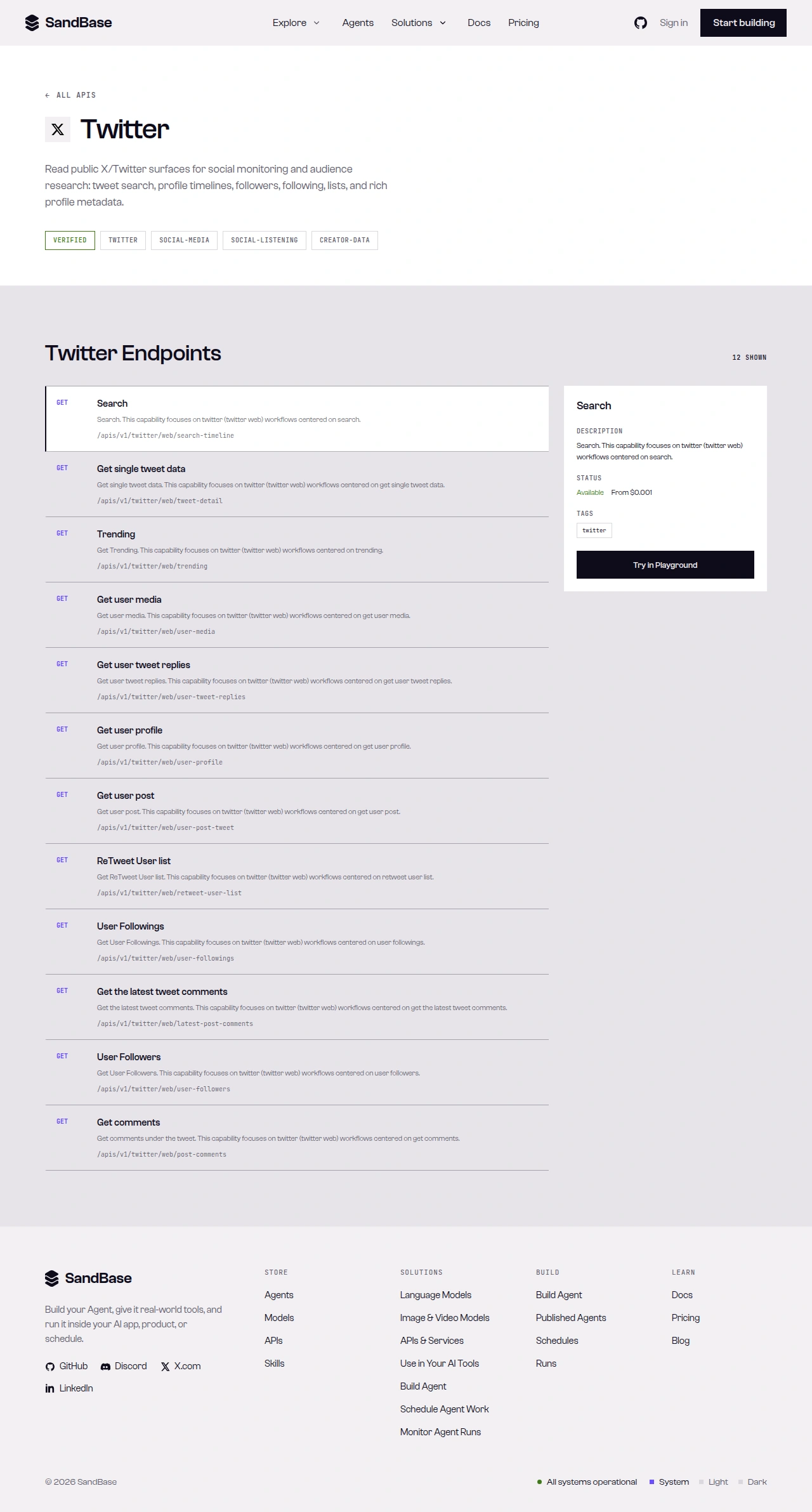 The X API page on SandBase — a tagged overview and the endpoint list, each with its path.
What X provides vs. what SandBase adds
Public data comes from X. SandBase does not own or operate X; it provides a uniform API layer for eligible public-data workflows. Each capability becomes one stable endpoint, auth collapses to a single key, and responses come back as predictable JSON — so an agent can chain “search a topic → open a tweet → read the author’s profile” along one convention instead of tracking X’s changing access tiers.
Quick start: your first call
SandBase exposes more than one API surface. The catalog may show GET paths under /apis/v1/...; this guide uses the vendor-qualified Model API path on each endpoint’s API reference. Do not swap the HTTP method or URL — follow the reference for the endpoint you choose.
Read a public profile by screen name:
import os
import requests

resp = requests.post(
    "https://api.sandbase.ai/v1/api/twitter/web/user-profile",
    headers={
        "Authorization": f"Bearer {os.environ['SANDBASE_API_KEY']}",
        "Content-Type": "application/json",
    },
    json={"screen_name": "NASA"},
)
resp.raise_for_status()
body = resp.json()
if body.get("status") != "completed":
    error = body.get("error", {})
    raise RuntimeError(error.get("message", "X request did not complete"))

# Field names below are an illustrative structure, not a guaranteed schema —
# use defensive .get() access and confirm the real path against a live response.
profile = body["outputs"][0]["data"]
print(profile.get("name"), profile.get("rest_id"), profile.get("statuses_count"))
curl -X POST https://api.sandbase.ai/v1/api/twitter/web/user-profile \
-H "Authorization: Bearer $SANDBASE_API_KEY" \
-H "Content-Type: application/json" \
-d '{"screen_name": "NASA"}'Every response uses the same envelope: an id, a status, the model name, and an outputs array whose single item carries the payload under data. Branch on status before reading outputs[0].data. The block below is an illustrative response shape for a user-profile read — the endpoint reference only guarantees the envelope, so treat the field names and values as an example structure, not a guaranteed schema, and confirm the exact fields against a live response, since payloads vary and change over time:
{
  "id": "13a394de-55e6-4c72-b0b1-604007a3757d",
  "status": "completed",
  "model": "twitter/web/user-profile",
  "outputs": [
    {
      "data": {
        "name": "NASA",
        "rest_id": "11348282",
        "blue_verified": true,
        "location": "Pale Blue Dot",
        "friends": 115,
        "statuses_count": 74334,
        "created_at": "Wed Dec 19 20:20:32 +0000 2007"
      }
    }
  ]
}
That rest_id is a stable identifier, and user-profile accepts it as an optional input. Other endpoints take their own identifiers — tweet-detail requires a tweet_id, and user-followers requires a screen_name — so check each endpoint’s reference for the input it accepts. A failed or timeout run carries error and never outputs. Response shapes differ by endpoint — inspect one real response and map the exact path per endpoint.
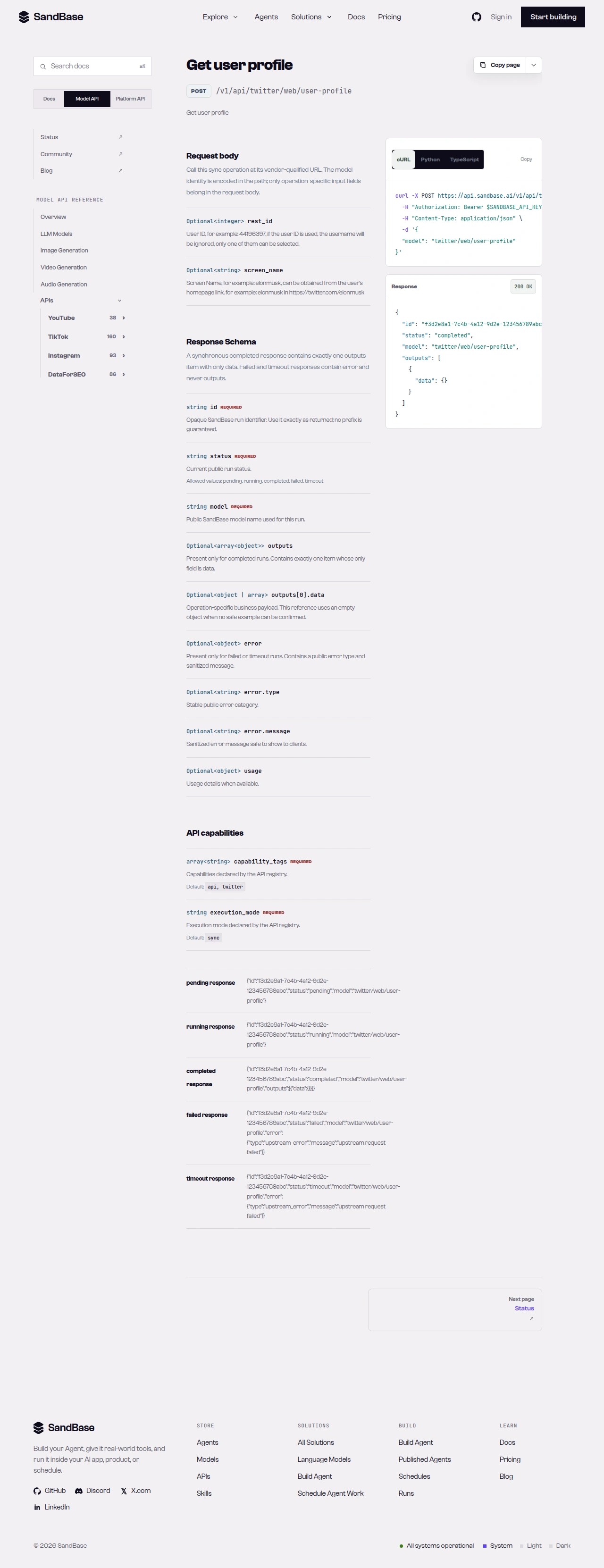 The endpoint API reference is the source of truth for each parameter name and response path.
Capability map
| Capability cluster | Representative endpoint | Typical use |
|---|---|---|
| Search | twitter/web/search-timeline | Topic and keyword discovery (Top/Latest) |
| User profile | twitter/web/user-profile | Public profile and account signals |
| Tweet detail | twitter/web/tweet-detail | Read a single tweet by id |
| Comments | twitter/web/post-comments | Reply threads and sentiment |
| Social graph | twitter/web/user-followers | Follower and following research |
| Trends | twitter/web/trending | Trending topics by country |
| Comments | twitter/web/post-comments | Reply threads by tweet id |
Paging differs by endpoint — several web endpoints (including search-timeline) accept an optional cursor request parameter that you carry over from the previous request. Read each endpoint’s schema.
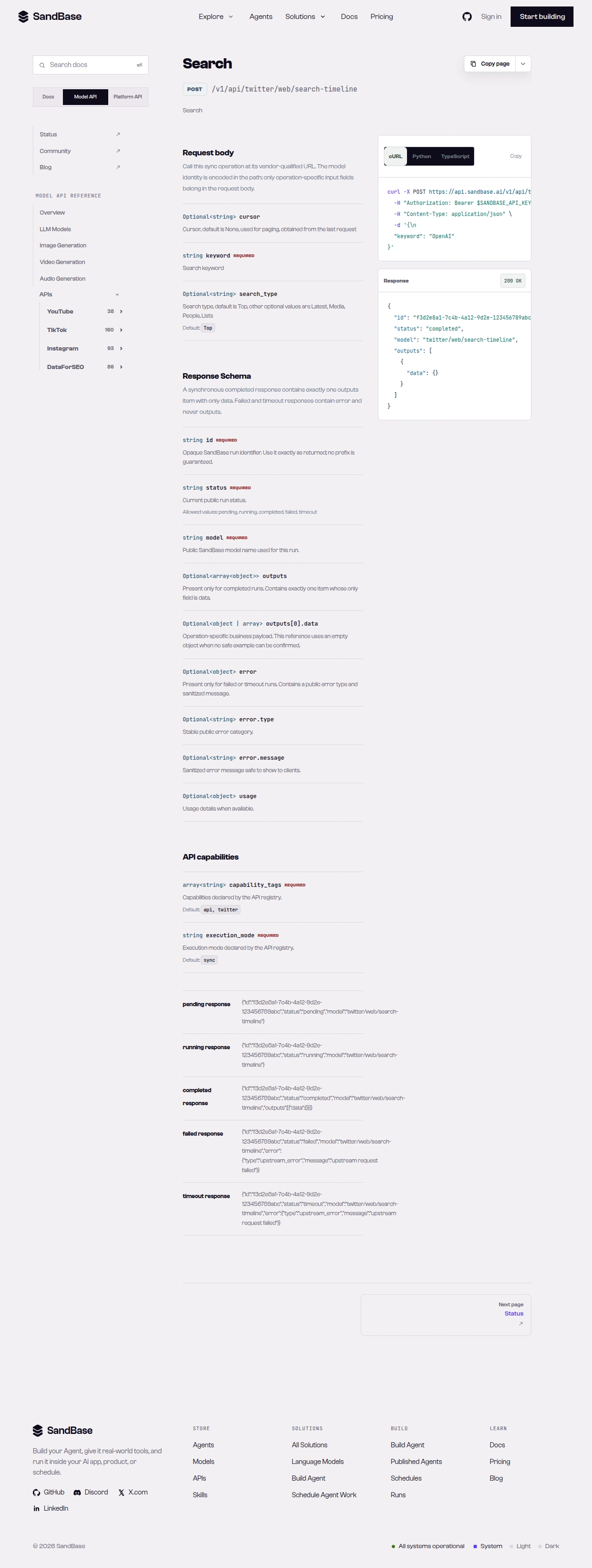 A slice of the X endpoint list on the web surface.
Chaining calls in an agent workflow
Because every endpoint shares the same auth and the same response envelope, an agent can walk from a search to an author profile without special-casing each surface. A common monitoring pattern looks like this:
- Discover. Call
twitter/web/search-timelinewith akeyword(Top or Latest) to find relevant tweets, carrying the optionalcursorover from the previous request to page. - Read the tweet. Call
twitter/web/tweet-detailwith atweet_id, thentwitter/web/post-commentsto pull the reply thread. - Profile the author. Call
twitter/web/user-profilewith ascreen_nameto attach account context.
Each step returns the same { id, status, model, outputs } shape, so your agent branches on status once and reuses the same JSON-reading code across every step.
Common use cases
X search API for topic monitoring
Run twitter/web/search-timeline with a keyword in Top or Latest mode to track a topic, then carry the optional cursor over to page. Input: a keyword. Output: a timeline of matching tweets. Endpoint: search-timeline. For a full workflow, see real-time X/Twitter monitoring: search to author.
X profile API for account research
Read a public profile with twitter/web/user-profile for fields like follower counts, verification, and account age. Input: a screen name. Output: a structured profile record. Endpoint: user-profile.
X trends API for real-time discovery
Pull twitter/web/trending by country to see what is surfacing right now. Input: a country (optional, defaults to UnitedStates). Output: a trend list. Endpoint: trending.
Limitations and boundaries
- Public, read-only data only. No posting, replies, DMs, or account-authorized actions.
- Rate and volume. Treat responses as best-effort reads; as a client-side resilience measure, retry with backoff on transient errors such as HTTP 429.
- Parameters and shapes follow the upstream surface. Identifiers vary (
screen_name,rest_id,tweet_id,keyword,country); several endpoints accept an optionalcursorfor paging. Inspect a real response and read the schema first. - Verify endpoints against the live reference. Availability and fields can change; confirm before building on a specific endpoint.
- This is not an official X partnership. SandBase provides uniform access to public data; respect X’s terms and applicable rules for your use case.
FAQ
Do I need an X developer account or OAuth?
No. You authenticate to SandBase with your SANDBASE_API_KEY. You do not sign up for an X developer tier or manage OAuth for these read endpoints.
What identifies a user or tweet?
Natural identifiers: screen_name or rest_id for users, and tweet_id for tweets. Search takes a keyword; trends take a country.
How does pagination work?
Several web endpoints (including search-timeline) accept an optional cursor request parameter that you carry over from the previous request. Read each endpoint’s schema.
Can I read protected accounts or DMs? No. The API returns public data only. Protected accounts, direct messages, and account-authorized data are out of scope.
Is there an applied agent guide? Yes — our X/Twitter API for AI agents guide walks through discovery, verification, caching, retries, and safe tool boundaries.
Start with one profile request
Create a SandBase API key, run user-profile against a public account, and inspect the returned schema before you expand to search, tweets, followers, or trends. When you are ready: