Pinterest Visual Research API Tutorial | SandBase
Make one Pinterest visual research API request: search a theme or read a known board, with checked responses, explicit costs and preserved historical evidence.

A designer with a theme such as “home office ideas” needs a search page. A researcher who has already chosen a brand’s public board needs that board’s pins. Those are different starting points: making the second person search and automatically selecting the first board can collect the wrong material. This Pinterest visual research API tutorial gives you either first request without running the whole discovery chain.
The update on 2026-11-08 checked free endpoint inspection and the current public reference samples. It did not execute a paid Pinterest business request. The earlier three-endpoint experiment, tested on 2026-09-27 UTC, remains below as historical evidence. The Pinterest API hub provides the wider endpoint map; this page concentrates on making one bounded request and interpreting its result.
Key takeaway
- Use
pinterest/searchwith a keyword query, orpinterest/boardwith a known full board URL.- The current helper reads only
outputs[0].dataand requires apinsarray. Missing data is an error, not an empty research result.- It makes one request, with no automatic board selection, pagination, retries, pin-detail calls or image downloads.
- Current inspection lists $0.018 per call for each endpoint and no
free_quota; this guide makes no free-call claim.
Choose a Pinterest visual research API task
| Input you already have | Choose | What this first page answers |
|---|---|---|
| A theme, category or creative direction | Pinterest Search | Which pins appear in this query sample? |
| A full public board URL | Pinterest Board Pins | Which pins appear on the selected board’s first returned page? |
A search sample is useful for collecting directions to review. A board sample is useful when the scope is already known: a competitor’s collection, a brand’s curated references or a board you want to inspect. Neither first page establishes popularity across Pinterest or a trend over time. Keep the query or board URL with the retrieval date so someone can understand the sample later.
The board input must identify a board, not a pin or a user’s profile. The reference example is https://www.pinterest.com/pinterest/official-news/. The helper below deliberately accepts only full HTTPS pinterest.com or www.pinterest.com addresses with owner and board path segments. It rejects pin URLs, shortened links, extra query strings and fragments. This is a local first-request guard, not a claim that the API supports no other URL variants. URL shape alone cannot establish that a board exists or is public.
Use your existing key or agent connection
If a project already uses SandBase, reuse its local SANDBASE_API_KEY or existing secret-store integration. If an agent is already connected, ask it to inspect the exact selected endpoint and reuse that connection. For a new project, give the agent the setup skill and Markdown quickstart, then describe the task and provide the keyword or public board URL. Keep the API key out of the prompt and generated source files.
For example: “Use my SandBase connection to inspect pinterest/board, then read the first page of this public board. Make one request and return the pin count or an explicit error. Do not select another board, download images, follow a cursor or retry.” If your starting point is a theme, request pinterest/search instead. The one-request stopping point makes it easier to review the result before funding a larger collection job.
For Python, install the dependency with python3 -m pip install requests, save the example as first_request.py, and run python3 first_request.py after configuring the key locally. The main block runs search only. To use a board instead, replace its result = ... line with result = first_request("board", os.environ.get("PINTEREST_BOARD_URL")) and set that variable locally. Keep the count-printing line. This switches tasks rather than appending another request.
One request using the current contract
Both operations use the Model API surface, POST https://api.sandbase.ai/v1/api/pinterest/<operation>, with endpoint parameters in the JSON body. The catalog’s GET /apis/v1/... listing is a separate surface. Preserve the POST route when copying the example.
| Parameter | Search | Board | This example |
|---|---|---|---|
query | Required string | Not used | Your nonempty keyword |
url | Not used | Required string | Your known board URL |
trim | Optional boolean | Optional boolean | Explicit true for a compact response |
cursor | Optional string | Optional string | Omitted for the initial page |
Neither optional property has a default declared in the inspected schema. trim: true is this example’s choice, not a claimed server default. The public responses contain pins and cursor directly inside the business payload; there is no need to invent a provider code: 0 rule or an additional nested data wrapper. The published search sample has no success flag; the board sample includes success: true. The helper accepts absence and rejects an explicit contradictory value.
import os
from urllib.parse import urlsplit
import requests


def first_request(task, value):
    if not isinstance(value, str) or not value.strip():
        raise ValueError("Provide a search query or a known full board URL")
    if task == "search":
        params = {"query": value.strip(), "trim": True}
    elif task == "board":
        url = urlsplit(value)
        parts = url.path.strip("/").split("/")
        if (value != value.strip() or any(c.isspace() for c in value)
                or url.scheme != "https"
                or url.netloc.lower() not in ("pinterest.com", "www.pinterest.com")
                or url.query or url.fragment or len(parts) != 2
                or not all(parts) or parts[0].lower() in ("pin", "search", "ideas")):
            raise ValueError("Use a full https://www.pinterest.com/owner/board/ URL")
        params = {"url": value, "trim": True}
    else:
        raise ValueError("Choose search or board")
    key = os.environ.get("SANDBASE_API_KEY", "").strip()
    if not key:
        raise RuntimeError("Set SANDBASE_API_KEY locally")
    try:
        response = requests.post(
            f"https://api.sandbase.ai/v1/api/pinterest/{task}",
            headers={"Authorization": f"Bearer {key}"}, json=params,
            timeout=(10, 90), allow_redirects=False,
        )
        if not 200 <= response.status_code < 300:
            raise RuntimeError(f"SandBase HTTP {response.status_code}")
        body = response.json()
    except ValueError:
        raise RuntimeError("SandBase returned invalid JSON") from None
    except requests.RequestException:
        raise RuntimeError("SandBase network request failed; not retried") from None
    if not isinstance(body, dict) or body.get("status") != "completed":
        raise RuntimeError("SandBase request did not complete")
    outputs = body.get("outputs")
    if not isinstance(outputs, list) or not outputs or not isinstance(outputs[0], dict):
        raise RuntimeError("Missing documented outputs[0].data")
    payload = outputs[0].get("data")
    if not isinstance(payload, dict):
        raise RuntimeError("Missing documented outputs[0].data")
    if "success" in payload and payload["success"] is not True:
        raise RuntimeError("Pinterest provider reported failure or malformed success")
    pins = payload.get("pins")
    if not isinstance(pins, list) or any(not isinstance(pin, dict) for pin in pins):
        raise RuntimeError("Missing or malformed Pinterest pins list")
    return payload


if __name__ == "__main__":
    result = first_request("search", "home office ideas")
    print("Pins on this page:", len(result["pins"]))
The example prints only the length of this page’s pins array. A valid empty list prints zero; absent or malformed pins raises an error. If the server returns an incomplete status or a legacy top-level output, execution stops. That distinction matters when an agent writes a report: a failed fetch must not become a claim that the board has no pins.
HTTP errors and redirects stop without a second request. The timeouts bound connection and read waits, and invalid JSON has a separate error. Errors do not echo the key or raw provider payload. Check credentials for 401/403, account or billing context for 402, and rate-limit context for 429 before deciding whether to make a separate attempt. This helper is intentionally not a retry policy.
Read the sample without expanding the workload
The retrieved public search example is compact: it shows a pin ID, URL and images.url. The board reference has a much wider historical payload, including board metadata and aggregated counters. Its trimmed sample includes aggregated_pin_data.aggregated_stats.saves: 99; that is an example value from the public reference, not a count measured by this update or a ranking for the board.
Optional metadata can differ by route and response format. Do not assume that every pin has a title, the same image-size structure or a save count. The helper returns the payload unchanged so an application can decide which fields it needs. Keep absent fields unknown, rather than manufacturing empty titles or zero engagement and then ranking those invented values.
Image URLs are references returned in JSON. Reading this page does not download those images, validate that each URL still works, or establish rights to republish them. If your next task requires a mood board, choose the specific images and output separately; do not let a first-request example silently become an asset crawler.
Both schemas declare a string cursor for subsequent requests, but this refresh did not test a cursor roundtrip. The public search example uses <next cursor> and the board example truncates its token. Neither can be copied as a usable continuation. Before implementing more pages, inspect a complete response, agree on a request limit and test the continuation separately. The presence of a cursor is not permission to keep fetching.
Cost before you widen the research
Free inspection on 2026-11-08 listed a $0.018 base price for each of pinterest/search and pinterest/board. Neither returned a free_quota entry. Budget the chosen one-call example at $0.018; do not apply a different data API’s free allowance to it. No paid request or account-balance lookup was performed for this update.
The board reference’s payload also contains upstream credits_charged and credits_remaining. Those numbers are not this reader’s SandBase dollar charge or remaining balance. Use the current SandBase pricing and your own usage records when reconciling costs. An optional compact response is not evidence of a cheaper call.
Historical three-endpoint experiment, 2026-09-27
The original article tested user-boards → board → search. Its verbatim bilingual Python archive preserves all twelve original code blocks with source-commit and SHA256 records. The old top-level output fallback, automatic first-board selection and all-board loop are retained only for provenance; they are not current executable instructions.
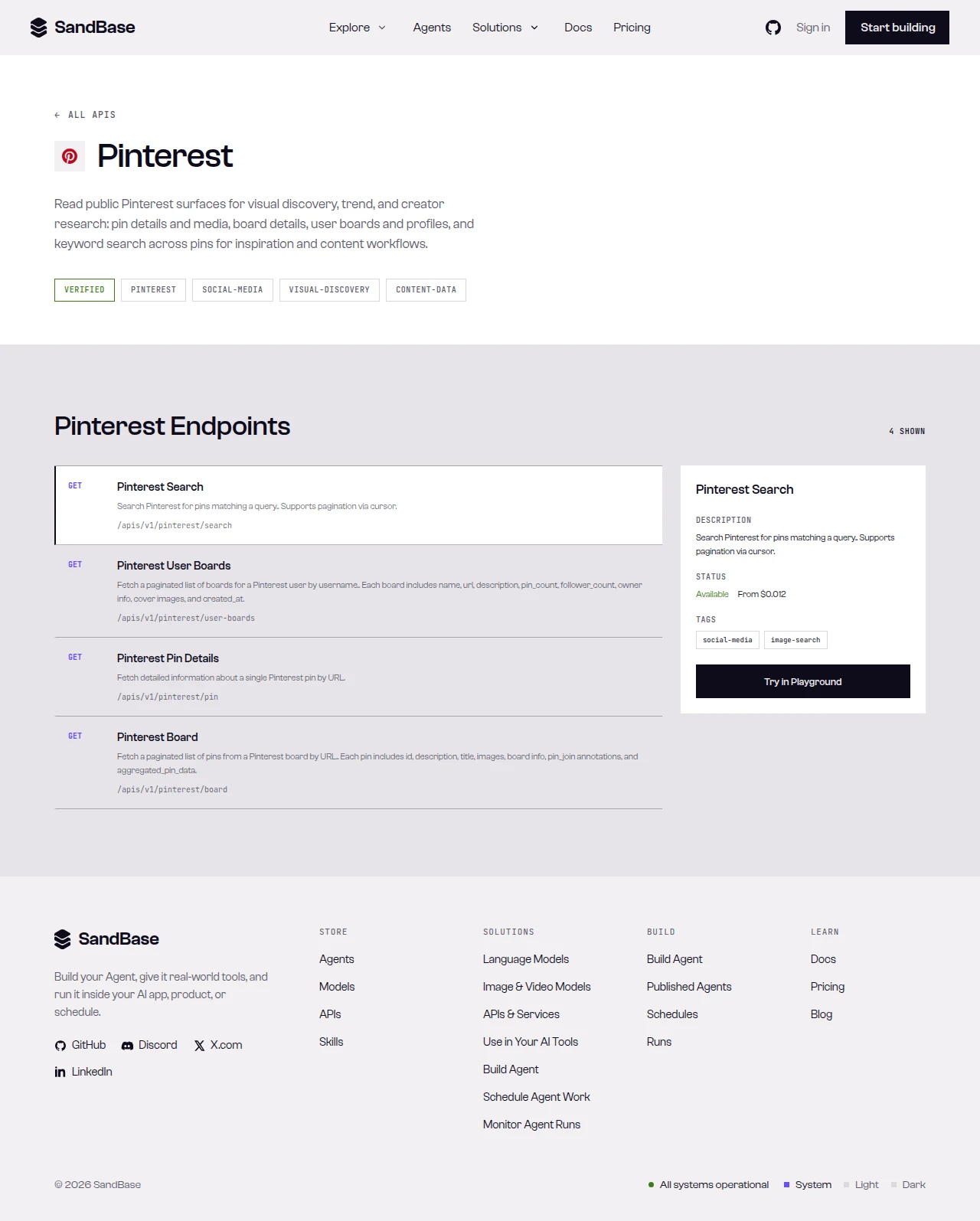 Historical catalog screenshot, 2026-09-27: the original user-boards, board and search discovery context. Its “From $0.012” price is historical, not the current $0.018 inspected price; the full chain was not rerun for this update.
The user-boards run 962cce4c-cfc8-4fb1-8ed4-943109e4dd97 used the public handle nike. The original record described success, boards and cursor, with board name, url, pin_count and description. This was a historical field observation; no fresh user-boards contract or live result is claimed here. In the old code, selecting the first board without checking the research goal could pick an irrelevant collection, or send a null URL when no board was available.
The board run 74fa4c3d-6e7d-4c0b-9d7a-61787d564a65 was recorded with success, pins and cursor. The original tutorial preserved the run ID and a field description, not a complete raw response. Do not reconstruct a missing historic response or present it as a new test. The current schema and public reference sample provide the separate evidence used for the revised helper.
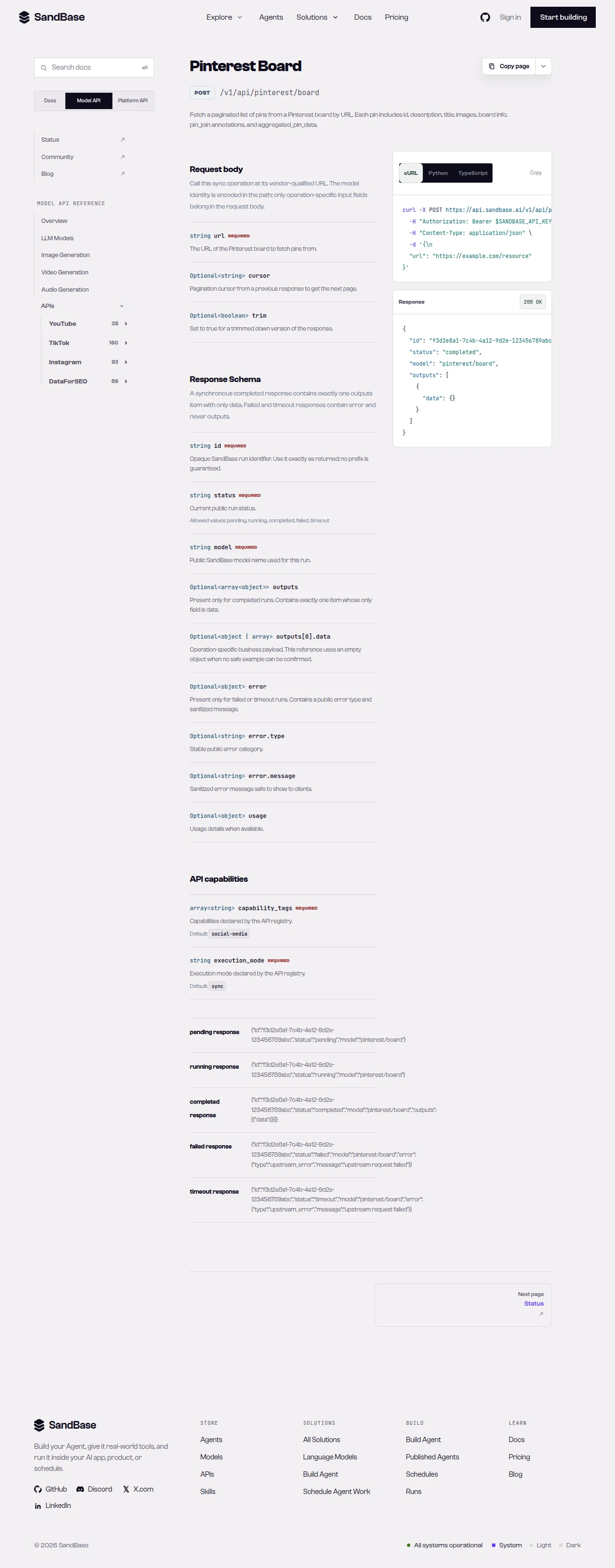 Historical board reference, 2026-09-27. Its url input and response documentation belong to that capture; current parameters were separately inspected for this repair.
The search run 7298c08a-09be-471b-978a-b155a323d9e3 used minimalist kitchen and was described as returning pins with a cursor. It demonstrated the earlier theme-search step, not stable rankings or exhaustive coverage. The old research() function called user-boards once, then each returned board, then search: for N boards with usable URLs it made N + 2 requests. That unbounded cost pattern is why the new example separates the two reader tasks.
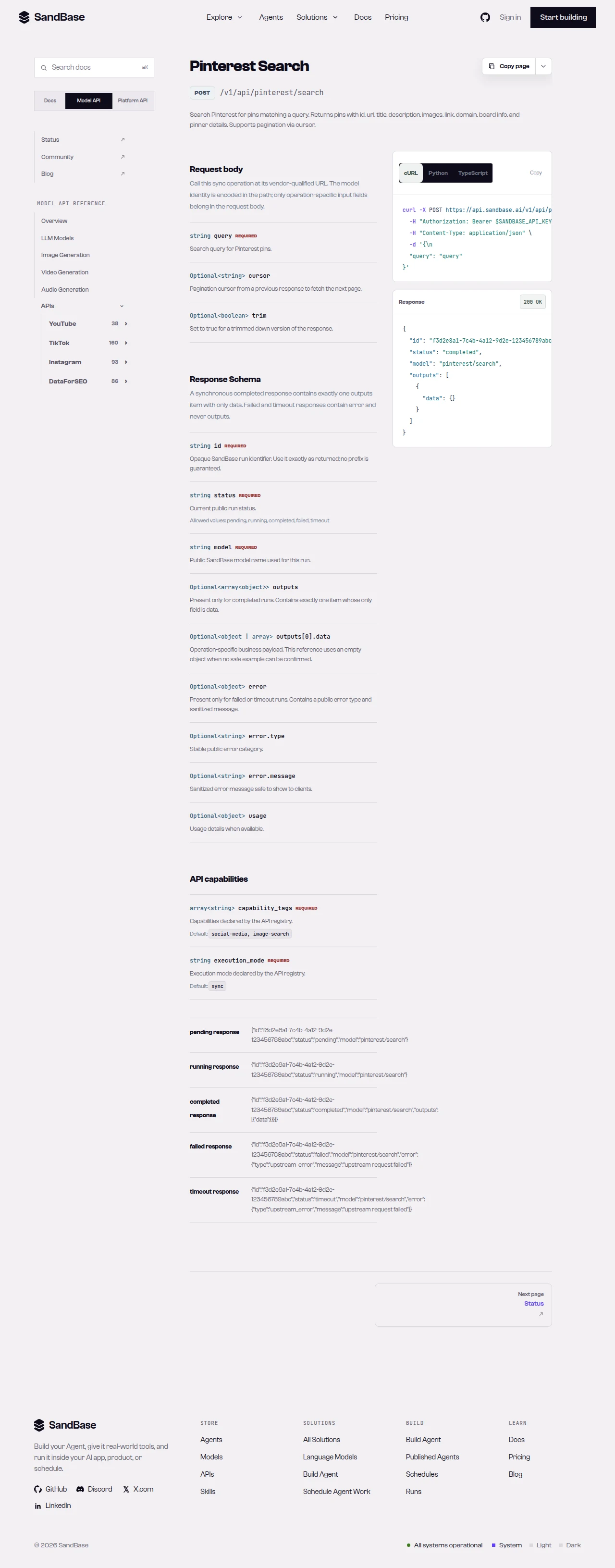 Historical search reference, 2026-09-27. The current example starts with query and omits cursor; this screenshot does not establish a tested continuation for the new code.
FAQ
Do I need a Pinterest account or SDK? These two schemas use SandBase authentication and do not ask for Pinterest OAuth or a login cookie. They concern public reads, not account actions or private boards.
Can I pass a pin URL to the board task? No. This helper expects an already chosen board URL. Pin detail and listing a user’s boards are separate operations outside this example.
Why not keep the top-level output fallback?
That was the old experiment’s observation. Current code follows the documented outputs[0].data contract and raises an error when it is missing, so a mismatch remains visible.
Can I keep fetching until the cursor disappears? Not with this first-request example. Pagination is a separate, bounded task requiring a complete token and validation; the public samples contain placeholders or truncated cursors.
Is the first call free? The inspected endpoints each list $0.018 and no free-quota entry. This guide does not promise a free request or reuse another endpoint’s allowance.
Start with the input you already have, review one returned page, and decide which additional research would justify another call.
Found this useful? Share it